
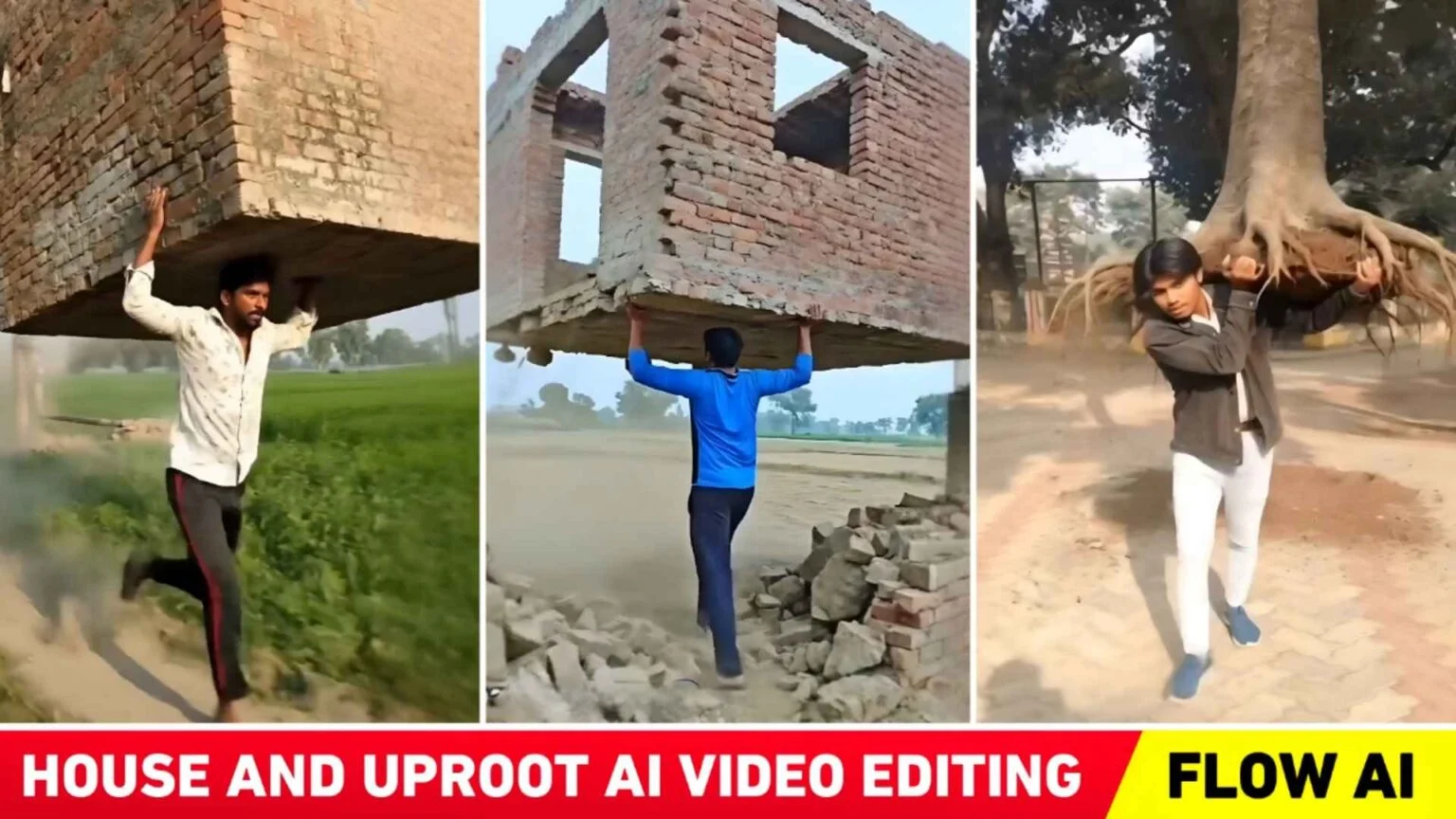
Right now, AI-generated videos are dominating social media platforms at a massive scale. Creators are experimenting with different AI video styles, uploading them online, and many of these videos are going viral within hours. In a previous article, we discussed the trending police handshake AI video edit. Today, we’re diving into another powerful and fast-growing AI video trend that’s catching everyone’s attention.
You may have already seen these viral Instagram reels where a person suddenly pulls a huge tree or even an entire building out of the ground and carries it on their shoulder. These clips look dramatic, cinematic, and almost impossible—yet they’re spreading rapidly across social media feeds. Because of this rising popularity, today’s article focuses on House and Tree Uproot AI Video Editing (2026 trend).
As you already know, these videos are created using AI tools, and prompts play the most important role in making them look realistic and viral. In this guide, we’ll share the exact concept behind these trending videos, explain what kind of photos you should use, and also provide prompts that allow you to create similar viral videos within minutes.
Details of House and Tree Uproot AI Video Editing
Before creating this viral AI video, you need to decide what type of scene you want to generate. There are mainly two formats that are trending the most:
- A person uprooting a house or building
- A person uprooting a tree
If you’re planning to create a house demolition-style video, your photo should clearly include a house or building in the background. For best results, always use a full-body photo, as the video usually shows the person lifting the structure and placing it on their shoulder.
In these videos, the action appears sudden and powerful—the person effortlessly pulls the house or tree from the ground and walks away carrying it. Most creators pair these visuals with a hopeless or emotional background song, which adds drama and boosts engagement. However, the music choice is completely personal, and many creators experiment with different audio styles.
To help you get started, we’ll provide two separate prompts:
- One for uprooting a house
- One for uprooting a tree
You can use either of them based on your preference. If you want to try something unique, you can also replace the words “house” or “tree” in the prompt with any other object. Still, based on current trends, these two formats are performing the best on Instagram.
Create a 4K cinematic realistic video using my uploaded photo as the fixed base reference. Keep the exact same house/building from the image unchanged in design and position, and the same person stands beside it. The ground cracks and shakes, then the person naturally grips that same house and pulls it out from its real foundation no new or different building appears. Dust and debris fall as it breaks free. He lifts it onto his forehead/head and walks forward carrying it. Real physics motion, natural body movement, cloth dynamics soft sunlight, true shadows, shallow depth of field, hyper-real live-action look, no exaggeration
Create a 4K cinematic realistic video using my uploaded photo as the fixed base reference. Keep the exact same house/building from the image unchanged in design and position, and the same person stands beside it. The ground cracks and shakes, then the person naturally grips that same house and pulls it out from its real foundation no new or different building appears. Dust and debris fall as it breaks free. He lifts it onto his forehead/head and walks forward carrying it. Real physics motion, natural body movement, cloth dynamics soft sunlight, true shadows, shallow depth of field, hyper-real live-action look, no exaggeration
Police Handshake AI Video Trend
This uprooting concept is similar in popularity to the earlier police handshake AI video trend. Both styles rely on realistic motion, strong visual impact, and emotionally driven music—making them perfect for reels and short videos.

Will the Face Change in These AI Videos?
Whether the face changes or not completely depends on the AI tool you’re using. If you choose the right tool, the face usually stays exactly the same as in the original photo.
From our observation, most creators are using Flow AI to make these videos. One of the biggest advantages of Flow AI is that it does not alter facial features in most cases. That’s why this article also explains how to create these videos specifically using Flow AI.
Occasionally, some AI tools may slightly modify the face. If that happens, you can fix it by adding the phrase “no face change” at the end of your prompt. Another helpful trick is to generate two or three output versions of the same video. Flow AI provides multiple results, and at least one of them will perfectly match your original face—though in most cases, all versions remain accurate.
When uploading your final video on Instagram, try pairing it with a hopeless or emotional song, as this style is currently performing extremely well.
How to Create House and Tree Uproot AI Videos Using Flow AI
We’ve already discussed the prompts and photo requirements. Now let’s look at the exact steps to create these viral videos using Flow AI:
- Open any web browser and search for Flow AI
- Click on the Create Flow option
- Log in using your Gmail account
- Click on New Project
- Select Frame to Video (not Text to Video)
- Click the plus (+) icon and upload your photo
- Crop the image properly and click Crop & Save
- Paste the prompt you copied earlier into the prompt box
- Click the Send button
- Wait a few moments while Flow AI generates your video
- Once the video is ready, preview it and save the best version
That’s it—your viral AI video is ready to post.
Shivratri AI Photo Prompt
Apart from uprooting videos, Shivratri-themed AI photos and videos are also trending. These can be created using similar AI tools and prompt-based methods.
Conclusion
AI-powered content is exploding on Instagram and other social platforms. From police handshake edits to dramatic house and tree uprooting videos, creators are using AI to push creativity to the next level. In this article, we explained the complete process behind this viral trend, including photo selection, prompt usage, and video creation using Flow AI.
We’ve covered both house and tree uprooting styles and shared practical tips to help you get the best results. After following this guide, you should be fully capable of creating your own trending AI videos. If you face any issues while making your video, feel free to ask—we’re always happy to help. 🚀