
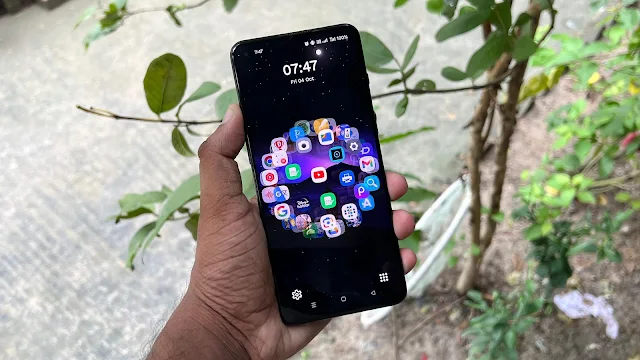
In today’s digital world, we spend a large part of our day looking at our mobile screens. That’s why many smartphone users love to personalize their home screens with creative wallpapers, icons, and themes. A unique home screen not only looks good but also reflects personal style.
If you’re someone who enjoys trying something different, DNA Launcher is an exciting Android launcher that transforms your home screen into a DNA-style structure, inspired by the human body’s genetic design.
What Is DNA Launcher?
DNA Launcher is a creative Android launcher that arranges your apps in a spiral, DNA-like formation instead of the usual grid layout. Once applied, your apps appear connected in a rotating helix pattern.
When you swipe across the screen, the app icons smoothly rotate, giving a futuristic and scientific visual effect. This makes your home screen look dynamic, modern, and completely different from standard launchers.
Why Choose DNA Launcher?
DNA Launcher is not just about visual design—it also offers powerful customization and smart features. Here’s what makes it special:
1. Complete Customization Control
DNA Launcher allows you to fully personalize your home screen. You can:
-
Resize app icons
-
Change icon colors and styles
-
Use different icon packs
-
Design custom icons if you want
Everything can be adjusted according to your taste.
2. Multiple Themes & Layout Styles
The launcher includes a variety of themes and layout options. You can download ready-made themes or create your own unique design, ensuring your phone never looks boring.
3. Smooth & Lightweight Performance
Unlike many heavy launchers, DNA Launcher is optimized for speed. It uses minimal RAM and runs smoothly, even on mid-range Android devices.
4. Gesture Controls & Smart Shortcuts
You can assign gestures like swipe, double-tap, or pinch to open apps or perform actions quickly. This saves time and makes everyday phone use more efficient.
5. Privacy & Security Features
DNA Launcher includes built-in options to:
-
Lock apps
-
Hide private apps
-
Protect personal data
These features help keep your information safe without needing extra security apps.
6. Smart & Adaptive Design
DNA Launcher uses intelligent analysis of your usage habits to suggest layouts and app placements. Over time, it adapts to how you use your phone and offers a more personalized experience.
User Experience with DNA Launcher
Using DNA Launcher feels refreshing and unique. Since you interact with your phone every day, having a visually engaging home screen improves the overall experience. The DNA-style rotation adds a sense of motion and creativity that instantly stands out.
It’s a launcher designed for users who want their phone to reflect innovation and personality.
How to Set DNA-Style Layout in DNA Launcher
Follow these simple steps:
-
Download and install DNA Launcher from the Google Play Store
-
Open the app and complete the initial setup
-
Go to DNA Settings
-
Tap on Launcher Style
-
Choose Holographic Mode from:
-
Classic Style
-
Minimalism
-
Holographic Mode
-
Once selected, your apps will appear arranged in a DNA-like structure.
Final Thoughts
DNA Launcher is more than just a home screen replacement—it’s a new way to experience your smartphone. With its DNA-inspired layout, smooth animations, deep customization, and smart features, it offers something truly different from traditional launchers.
If you want your mobile home screen to look futuristic, scientific, and visually stunning, DNA Launcher is an excellent choice. Try it once, and your phone will never feel ordinary again 🧬📱