
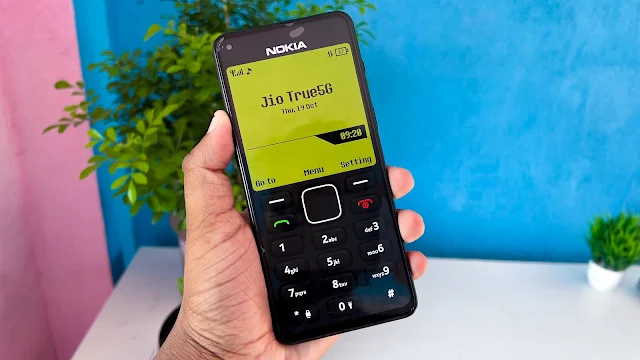
Technology is moving forward faster than ever, and smartphones are becoming smarter day by day. But as new devices arrive, many iconic mobile phones from the past slowly disappear from our daily lives. One such unforgettable device is the Nokia 1280—a phone known for its simplicity, durability, and classic design.
Now, you can relive those memories again. With Nokia 1280 Launcher, your modern Android smartphone can look and feel just like the legendary Nokia 1280. At first glance, it becomes difficult to tell whether the device is a smartphone or a classic Nokia phone.
What Is Nokia 1280 Launcher?
Nokia 1280 Launcher is an Android launcher app that transforms your smartphone’s interface into the classic Nokia 1280 style. Once activated, your phone displays the same simple layout, old-style menu, and button-based design that made Nokia phones so popular.
It brings back the charm of small screens, bold fonts, and minimal options—perfect for users who miss the old-school mobile experience.
Why Nokia 1280 Was So Special
The Nokia 1280 was loved for:
-
Its clean and simple interface
-
Large, easy-to-read buttons
-
Strong battery performance
-
The legendary Snake game, which entertained millions
With Nokia 1280 Launcher, you can now enjoy that same interface on your Android phone without giving up smartphone functionality.
Key Features of Nokia 1280 Launcher
1. Classic Nokia-Style Interface
The launcher recreates the original Nokia 1280 look with a basic menu, large buttons, and a simple display. It feels just like using a real button phone.
2. Customizable Icons & Themes
You can personalize the launcher by:
-
Changing icon styles
-
Adjusting theme colors
-
Modifying the dial pad button colors
This allows you to customize the classic look while keeping its original feel.
3. Change Phone Name
The launcher lets you edit the phone name displayed on the interface. You can keep it as “Nokia” or change it to any name you prefer.
4. Preview Mode Available
Before setting it as your default launcher, you can preview the Nokia 1280 interface. This helps you decide without permanently changing your home screen.
How to Use Nokia 1280 Launcher on Android
Follow these simple steps:
-
Open the Google Play Store
-
Search for Nokia 1280 Launcher
-
Install the app
-
Open it and set it as your default launcher
Once activated, your smartphone will instantly transform into a Nokia 1280-style phone.
How to Remove Nokia 1280 Launcher
If you want to switch back to your original launcher:
-
Open the launcher menu
-
Tap the top-left menu option
-
Select Exit Launcher
-
Choose your phone’s default launcher
Your phone will return to its normal Android interface.
Advantages and Limitations
Advantages:
-
Brings back classic Nokia memories
-
Very simple and user-friendly
-
Clean and distraction-free interface
-
Ideal for nostalgic users and minimalists
Limitations:
-
Limited advanced features due to its simple design
-
Not suitable for users who prefer modern UI elements
Final Thoughts
Nokia 1280 Launcher is not just an app—it’s a time machine. It brings the golden era of mobile phones back to life on modern smartphones. Whether you want to relive old memories or surprise others with a phone that looks like a classic Nokia, this launcher does the job perfectly.

Once activated, many people won’t even realize you’re holding a smartphone. If you miss the simplicity of old Nokia phones and want that experience again, Nokia 1280 Launcher is absolutely worth trying 📱🕰️